Organize your team
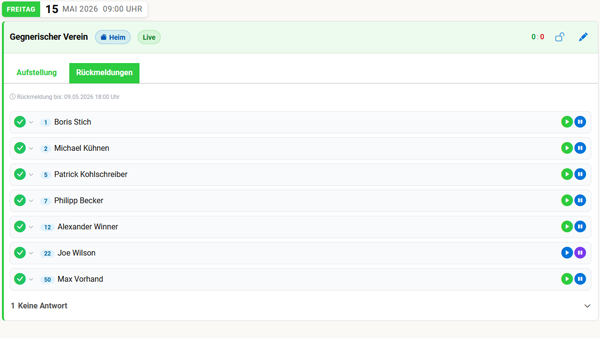
Manage the full match day – from the first availability poll to the final lineup.- Replies at a glance: See every teammate’s status – yes, no or maybe.
- Stress-free lineups: Build the team for match days, set backups – and notify the selected players.
- Join via team link: Players don’t need their own account – they can take part and reply with the team link.
- Automatic updates: The team is informed about match days, dates and changes – and gently reminded to reply.
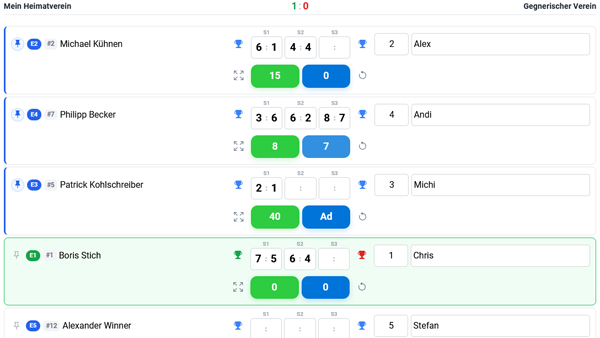
Your stage at the club: the live ticker
Turn every match into a highlight for the whole club! Enter scores live on your phone. With the spectator link, the entire club can follow along – strengthening club life for everyone.
Perfectly connected in training & winter too
Your team spirit doesn’t take a break! Use the same easy approach for weekly training or your shared indoor court subscription in winter.- Relaxed recurring dates: Set them up once – training and indoor bookings run themselves, week after week of tennis fun without the admin.
- Use courts wisely: With real-time yes/no replies you always know exactly how many courts you need.
- Built-in billing: Add prices and costs are calculated automatically based on who’s coming.
Voices from the team
"Setting the lineup is a breeze now. I just create the match day and see every reply at a glance. That leaves so much more time for what matters: enjoying tennis together."
MK
"My players don’t need an app or a separate account. They open the team link, see everything and reply right away. Team organisation has never been this easy."
SF
"Training and our indoor subscription are just as relaxed as match days. The automatic cost breakdown is fair, transparent and saves us real time at the end of the season."
JW
Team management made easy
Get your team on your phone – 100% free, available anywhere and ready in seconds.
Create account
Choose club
Create team
Frequently asked questions
We already have a chat group. Why should we switch?
Who can play on Sunday? Who is driving? Who is bringing food? With PLAYmunity, every player simply taps accept or decline, and the team captain instantly has a clean, clear list for match day – always up to date.
Do all team members need their own PLAYmunity account?
No. If players on the team do not want to create an account, they can simply enter their availability via the shared team link in the browser.
I play on two teams (e.g. Men's 30 and Men's 40). Is that possible?
Yes, that works without any problem. In your profile you see match days and events for both teams clearly separated, and you can accept or decline for each team individually.
Who can create a team in the app?
Both the club manager (e.g. the sports director) and you as team captain can create teams. Team captains can set match days, create events, plan lineups, and invite team members. Other players can join teams once the captain approves them.
Can we also organize team training with it?
Yes! Besides official league matches, you can also create regular team training sessions. That way you always know in advance whether you will be four or eight on court on Tuesday evening. You can also calculate and split any costs directly.